Changing the Display Theme
This page explains how to change the display theme (color scheme) of Agentiqs.
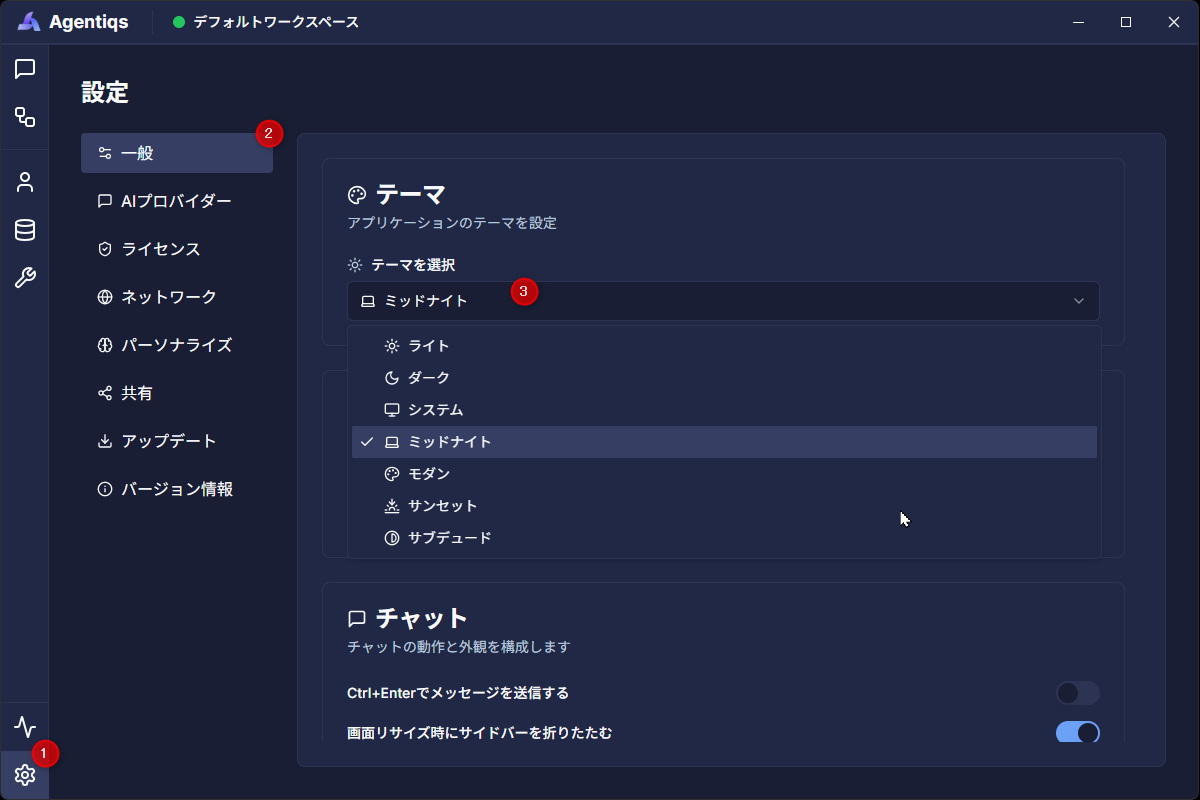
Procedure
- Click [Settings] > [General].
- The settings screen will appear.
- Select the theme you want to use from the [Theme] > [Select Theme] dropdown.
- Once you select a theme, the color scheme on the screen will be immediately reflected in the selected theme.
Available Themes
| Name | Description |
|---|---|
| Light | A standard theme with a light background and dark text. Suitable for daytime viewing. |
| Dark | Dark background and light text color. Enhances visibility at night or in dark environments. |
| System | Automatically synchronizes with OS theme settings (light/dark). |
| Midnight | A dark theme with enhanced contrast. Suitable for applications where visibility is important. |
| Modern | A theme with strong accent colors and a contemporary color scheme. |
| Sunset | A soft-toned theme using warm accent colors. |
| Subdued | A calm-toned theme suitable for long-term use. |