Check AI Model Usage Fees
AI Model Usage Fees
This page explains how to check the usage fees for AI models used in Agentiqs.
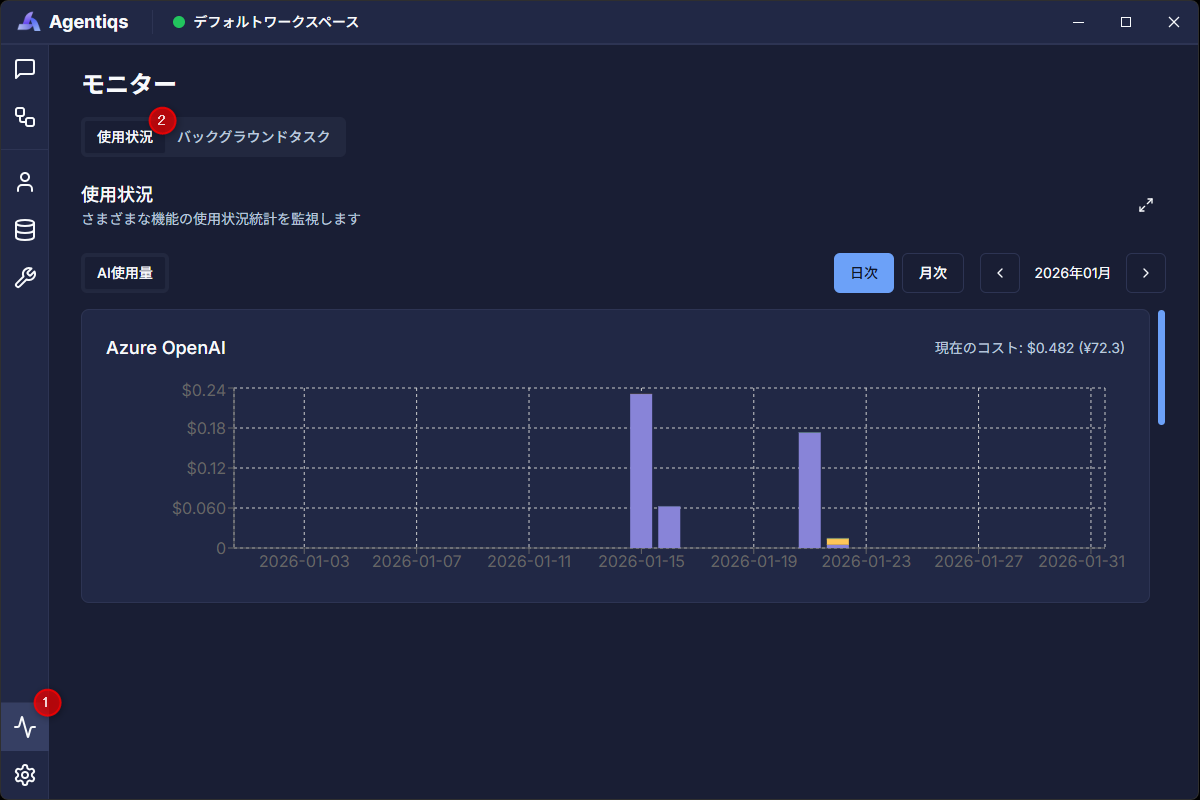
Procedure
- Click [Monitor] > [Usage].
- Usage fees are displayed for each AI provider.
Exchange Rate
- Usage fees are calculated based on USD.
- To check in Japanese yen, set the exchange rate in [Settings] > [General] > [Currency Settings].
Note
- The displayed amounts are estimated usage fees.
- They are calculated based on the amounts configured in AI Provider Settings. If nothing is configured, it will not be added to the amount.
- For exact fees and the latest pricing information, please refer to the official information from the AI provider you are using.
- Usage fees are displayed per device. If you are using multiple devices, add up the amounts displayed on each device.
Cost While Chat Is Running
While the AI is generating a response, the message footer displays the cumulative cost and token count in real time up to the current point.
- If a long-running task consumes more than expected, this helps you decide whether to cancel it midway.
- Even if processing is stopped midway, the cost consumed up to that point is recorded.
- Examples: canceled execution, ended with an error, closing the browser, and so on.
Note
The displayed cost is a reference value only up to completed LLM calls.
When canceled or when an error occurs, the cost is displayed with a + as a lower bound (for example, $0.137+).